项目中可能会遇到这样的简单需求,就是要点击相关的按钮在文本编辑器的光标处点插入相应的纯文本(不带格式粘贴);同时文本编辑器要求有不带格式粘贴的功能。
涉及到的知识是对光标的处理、剪贴板处理相关的知识。
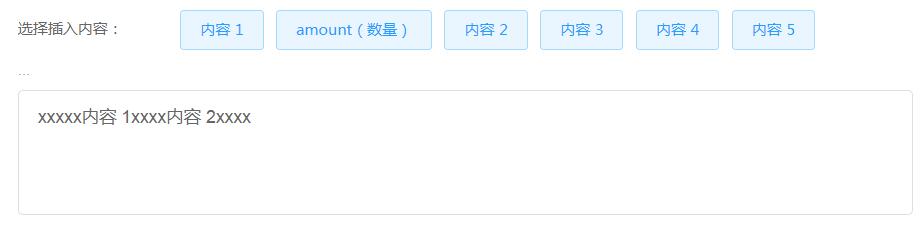
简单富文本编辑器界面如下:
代码如下:
            const $input = document.getElementById('my-input')
            const $btns = [...document.querySelectorAll('.my-btn')]
            let lastEditRange
            // 重置 placeholder
            function resetPlaceholder () {
                if ($input.innerText.length > 0) {
                    $input.classList.remove('placeholder-visible')
                } else {
                    $input.classList.add('placeholder-visible')
                }
            }
            resetPlaceholder()
            // 点击事件
            $input.onclick = function () {
                // 获取选定对象
                // 设置最后光标对象
                lastEditRange = getSelection().getRangeAt(0)
            }
            // 编辑框按键弹起事件
            $input.onkeyup = function () {
                // 获取选定对象
                // 设置最后光标对象
                lastEditRange = getSelection().getRangeAt(0)
                resetPlaceholder()
            }
            $input.onpaste = function (event) {
                const e = event || window.event
                // 阻止默认粘贴
                e.preventDefault()
                // 粘贴事件有一个 clipboardData 的属性,提供了对剪贴板的访问
                // clipboardData 的 getData(fomat) 从剪贴板获取指定格式的数据
                const text = (e.originalEvent || e).clipboardData.getData('text/plain') || prompt('在这里输入文本')
                // 插入
                document.execCommand('insertText', false, text)
            }
            $btns.forEach((el) => {
                el.onclick = function () {
                    // 获取值
                    const dataVal = el.getAttribute('data-val')
                    $input.focus()
                    // 获取选定对象
                    const selection = getSelection()
                    // 判断是否有最后光标对象存在
                    if (lastEditRange) {
                        // 存在最后光标对象,选定对象清除所有光标并添加最后光标还原之前的状态
                        selection.removeAllRanges()
                        selection.addRange(lastEditRange)
                    }
                    // console.log(selection.anchorNode.nodeName)
                    if (selection.anchorNode.nodeName === '#text') { // 在文本中插入
                        // 如果是文本节点则先获取光标对象
                        const range = selection.getRangeAt(0)
                        // 获取光标对象的范围界定对象,一般就是 textNode 对象
                        const textNode = range.startContainer
                        // 获取光标位置
                        const rangeStartOffset = range.startOffset
                        // 文本节点在光标位置处插入新的表情内容
                        textNode.insertData(rangeStartOffset, dataVal)
                        // 光标移动到到原来的位置加上新内容的长度
                        range.setStart(textNode, rangeStartOffset + dataVal.length)
                        // 光标开始和光标结束重叠
                        range.collapse(true)
                        // 清除选定对象的所有光标对象
                        selection.removeAllRanges()
                        // 插入新的光标对象
                        selection.addRange(range)
                    } else if (selection.anchorNode.nodeName === 'DIV') { // 内容为空时,点击按钮
                        const dataValText = document.createTextNode(dataVal)
                        $input.appendChild(dataValText)
                        // 创建新的光标对象
                        const range = document.createRange()
                        // 光标对象的范围界定为新建的表情节点
                        range.selectNodeContents(dataValText)
                        // 光标位置定位在表情节点的最大长度
                        range.setStart(dataValText, dataValText.length)
                        // 使光标开始和光标结束重叠
                        range.collapse(true)
                        // 清除选定对象的所有光标对象
                        selection.removeAllRanges()
                        // 插入新的光标对象
                        selection.addRange(range)
                    }
                    resetPlaceholder()
                }
            })
JS 实现复制功能(document.execCommand)
function copy(text) {
    const input = document.createElement('input');
    document.body.appendChild(input);
    input.setAttribute('value', text);
    input.select();
    if (document.execCommand('copy')) {
      document.execCommand('copy');
      console.log('复制成功');
    }
    document.body.removeChild(input);
}
参考引用:
1. contenteditable change events
2. html 元素 contenteditable 属性如何定位光标和设置光标
3. contenteditable 插入及粘贴纯文本内容

